FAQ

What is Drivers Backup?

Drivers Backup is a software designed to help you never lose any drivers again. It can help you keep organized backups of your system drivers and the third party hardware drivers, with only a few clicks.

How does it work?

The software shows you a list of all the drivers Windows depends on. You can then create a backup file with all these drivers. In case there are any problems with your computer in the future, you can restore these drivers so you don’t have to search for each hardware provider’s CD.

Screenshots

Drivers Backup is very easy to use. You can click the “Backup” or “Restore” buttons from the top to choose the work mode.

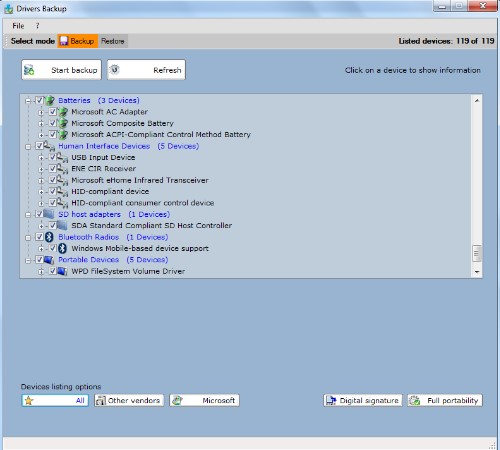
For the backup mode, first you get a full list of the drivers on your computer:

List drivers from the computer

Then you can select the drivers you want to include in your backup file and click the “Start Backup” button. You will see the backup options, as below:

Backup Drivers Easily for Free

NOW FREE

Looking for an easy way to keep your Windows drivers when rebuilding your computer?

The new Drivers Backup does it all & MORE! Using powerful detection techniques, Drivers Backup will save you TIME and stress when reinstalling your operating system.

Drivers Backup uses an easy and intuitive interface to help you backup and restore all those valuable drivers that you installed over time.